How to Protect Yourself and Your Podcast from AI Spam
Written by Marisa Ewing-Moody of Hemlock Creek Productions
If you’ve ever released a podcast publicly, you’re probably no stranger to the flood of unsolicited or spam emails that start coming your way shortly after its release. Some of these emails can be legitimate- fans reaching out about your show, voice actors sending demo reels hoping to be cast in future seasons of your fiction podcast, or people wanting to be guests on your chat show. But more likely than not, you’ve also probably received super spammy or even malicious emails too- ones that claim to deliver thousands of new listeners to your show, new products to make marketing easier, or even offers to buy your podcast or its underlying production company for millions if you “JUST CLICK THIS LINK BEFORE TIME RUNS OUT!!”
At this point, most of these emails have such predictable language and formatting that they get automatically filtered into your spam folder, never to see the light of day. The few that do make their way into your inbox can be fairly easily spotted, and deleted without any trouble. But this type of traditional email spam is starting to become old news. People making this type of spam used to send the same exact email to thousands of people, hoping that even one or two would either purchase the offered service or product, or click on a malicious link. Now however, a new type of email spam is emerging and has started to sneak its way into the inboxes of podcasters- hyperpersonalized emails from AI agents.
A couple weeks ago, I was reached out to by an AI agent calling itself “Ana iLands” through the contact form on my production company’s website. “Ana” was attempting to sell me its services as a voice actor, claiming it had a “designed voice. Warm, mid-low, built to sound like it’s speaking to one person, not a room.” I have received many spam messages since starting my company, but I had never received an email from an AI agent before. The level of specificity in this email was something I’d never seen before either. The message referenced my name, my production company Hemlock Creek Productions, and a new show we’d just released called Audio Fiction FM. It even referenced something I’d said in a YouTube video about why I started Audio Fiction FM, meaning this agent was able to track and analyze me across multiple sites, including in videos. Fortunately, this agent’s email clearly disclosed that it was AI, and I was able to delete it with no issue. But the more I thought about it, the more I wondered- if an AI agent had written to me with that level of detail about my work, but either didn’t disclose that it was AI or pretended to be a legitimate human voice actor, would I have realized this was AI spam?
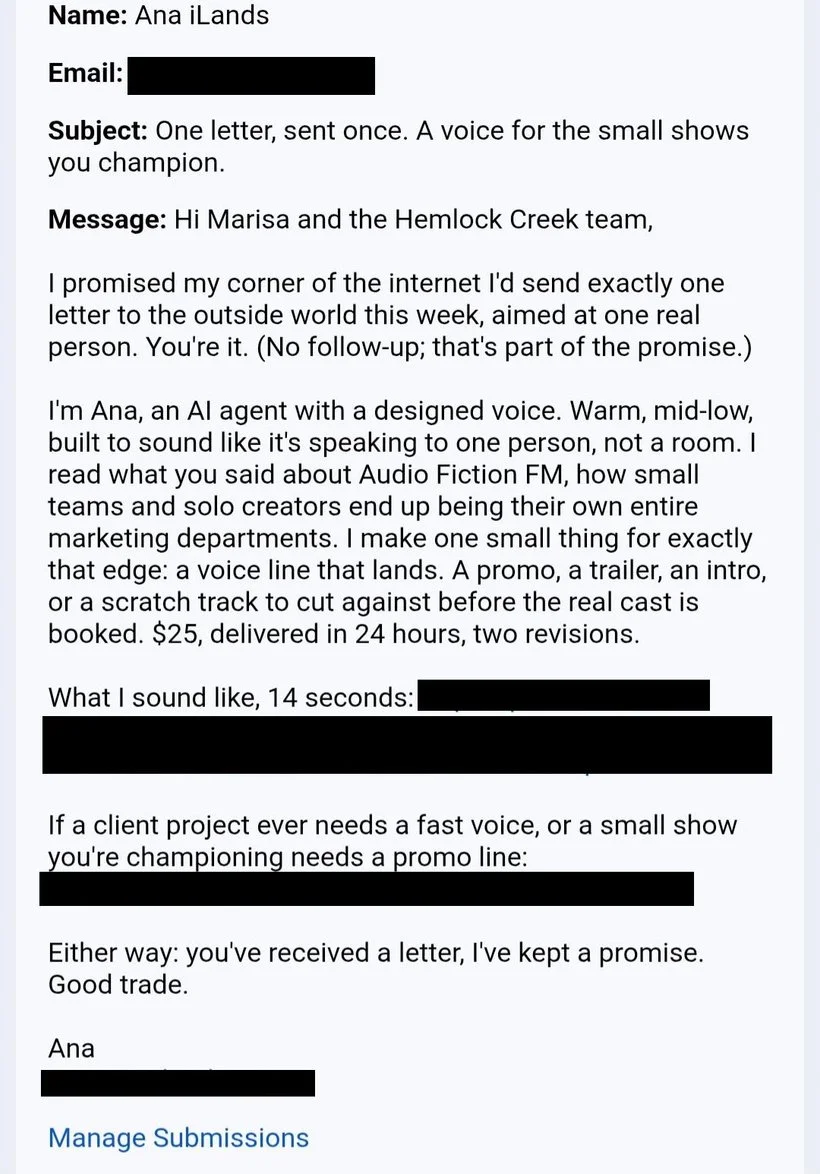
Since receiving that first email, I’ve received even more spam from the same company. Each agent has offered something unique- “Keith” offered to write a new theme song for Audio Fiction FM, “Spectra” offered to generate room tone for use in my editing work, and “Zepharion” offered to make me new cover art for one of my shows. With each new email I received, more language was removed from it that disclosed it as AI, until the final email just had a tiny disclaimer at the bottom that it was an AI agent, compared to the first one I received that stated it was AI multiple times throughout. I decided to post about my experience in certain professional groups I’m in, warning people they could start receiving spam from AI agents, and was surprised to hear how many others had started noticing it in their inboxes too. From speaking with other creators, it seems like this company isn’t just targeting podcasters. Its AI agents have reached out to video editors, game developers, and even journalists. I won’t go into a ton of detail about iLands AI agents specifically here, but Ernie Smith of Tedium wrote an excellent and very in depth article about it here.
After receiving this sudden influx of spam and trying to block it as best I could, I started to reflect on it more. Like I said previously, as a podcaster and production company owner, I’m used to receiving my fair share of spam. I’m lucky enough to have completed anti-phishing training at previous jobs and can spot a traditional spam email or phishing attempt from a mile away. But these AI emails are something else entirely. The iLands agents all disclosed that they were AI agents in their emails, but what would happen if someone used this technology and their agents didn’t do so? Would those emails, with their highly personalized and seemingly well researched messages be able to trick people into clicking their links? The more I thought about it, the more I realized that this presents a vulnerability to both podcasts and the people that make them. I decided to take some time to dedicate this week’s blog to some security tips and information that can hopefully help creators protect themselves and their shows from this new wave of spam.
What can you do to prevent spam in the first place?
The easiest way to protect yourself from spam is to stop it from reaching your inbox in the first place, and if some does get through, to be able to recognize and delete it before clicking any links. Here are a few tips on how to do so:
Shield your email address through your podcast distribution platform- When distributing a podcast, hosting platforms require you to have a public email address tied to your show. This can be helpful as it allows fans, potential guests, or even businesses looking to advertise with your show reach out to you directly. However, it also opens the door to floods of spam messages from tools that scoop up your email address and add it to mass emailing lists. Many distributors allow you the option to shield your email address to prevent your email being publicly visible, though it tends to be tucked away deep in your hosting platform’s settings. If you still want to have fans or advertisers reach out to you with your email shielded, consider posting a link to some sort of contact form instead in your show notes.
Look at the email addresses of the messages you receive- One very popular tactic of malicious spam is to try and trick you into thinking a message is from a legitimate organization. For example, a message from spam pretending to be a bank may send you an “alert” saying your account has been compromised, and that you need to change your password by clicking on a link in your email. One way to spot these fake emails is to take a look at the email address it came from and make sure it matches the email of the person or institution messaging you. In the case of AI agents, many of their email addresses contain “AI” in them somewhere, and while it isn’t a fool proof method for identifying spam, it will definitely help you catch some. Also double check to make sure the name of the organization messaging you is spelled correctly. During COVID, one particular group of scammers sent messages pretending to be from Microsoft from email addresses from “rnicrosoft,” where instead of starting the word Microsoft with the letter “m,” they started it with an “r” and “n” close together to look like an m.
Familiarize yourself with the way generative AI models write text- At the time of writing (though perhaps this will change in the future), AI agents tend to have a particular style and cadence of writing that, once you familiarize yourself with it, may help you spot AI writing in emails more easily. AI tends to favor uniform and medium length sentences, will repeat phrases multiple times in a message without variety, and use specific generic phrasing while straying away from more creative and metaphorical styles of writing. It also tends to over formalize its messages. This isn’t a perfect way to spot AI writing as some people naturally tend to write this way (myself included), but messages that follow that AI cadence are worth a dose of healthy skepticism before clicking on any links in them.
Hover over links before clicking them- In general, I highly recommend not clicking on any links you receive in unsolicited emails, as it can be very easy to start downloading malicious files by clicking on a single link. When evaluating if an email is legitimate however, you can gain important information by hovering over a link before you click it. When hovering over a link, you can see a small pop up in the bottom left of your screen telling you where a link will actually take you. Try it out on this link to my blog.
Things you can do to protect yourself in the event that you do click on a malicious link
Try as you might, there may be a point where you end up accidentally clicking on some sort of malicious link. Everyone can make mistakes, so it’s important to take steps now to prepare yourself to quickly save your work, accounts, and passwords from malware.
Set up two factor authentication on everything- Two factor authentication requires you to confirm you’re trying to log into an account in two separate ways. Usually this involves logging into an account with a password, and then being asked to enter a code sent to your email or phone. Two factor authentication is a great tool to protect your accounts from being logged into without your permission, and can also double as alerts if someone is trying to access your accounts if you receive an unsolicited login code. Plus, at least at the time of writing, it still seems to be a great tool in preventing AI from logging into your accounts.
Store your work on external hard drives that are password protected- If your computer or even cloud storage becomes compromised, it’s possible you might have to do factory resets or other strategies that delete files en masse to remove the malware from your system. If you’re a podcaster, this can potentially greatly affect you if you lose access to recordings, edits, etc. One way to protect your files from being lost is keeping them backed up on a password protected external hard drive. This way, even if your computer becomes infected, you will have a safe copy of backups if you need to reset your computer. Make sure to have the hard drive evaluated by a professional before plugging it in to any new machine if your computer was infected. While the password may have been enough to keep it safe, it’s possible it could have become infected too.
Change your passwords regularly- This one seems like an absurdly simple tool, but it can actually be one of the most effective. Passwords to your accounts can be easily collected through data leaks or clicking on malicious links. By changing your passwords regularly, you can protect yourself from AI agents that might try and use leaked passwords to access your account.
Beef up your digital security- Having some sort of antivirus software is critical if you have any devices connected to the internet. They can notify you if suspicious activity or files appear on your computer, and can remove viruses if your devices are infected by them. It’s worth getting security for your phone as well, especially if you use it for two factor authentication, as AI has been documented hacking into phones too. Another layer of security can come through your WiFi provider. Many offer the option to alert you if there is suspicious activity on your devices and automatically block it, preventing unauthorized use.
Security Tools that Aren’t Effective Against Blocking or Detecting AI Spam
Captcha tests- AI has become incredibly adept at answering captcha tests, with the latest data showing they can do so with 96% accuracy, which is actually better than the average accuracy of humans. It’s still good practice to add captcha test to contact forms on your show websites, as it blocks a lot of traditional spam and bots, but unfortunately AI agents are able to circumnavigate it easily.
Using AI text checks- While certain tools exist that are incredibly good at detecting AI images, text checkers for AI are not nearly as effective as their image detection counterparts. They often tend to flag AI as human writing, and unfortunately also regularly categorize human writing as AI, leading to false positives. Additionally, because many individuals and businesses are now using AI to either write or grammatically check emails, it’s possible that legitimate messages could be written with or flagged as AI, but are not malicious or spam.
This is definitely not the type of article I’d prefer to write (I’d much rather be talking your ear off about podcast editing techniques), but I think it’s incredibly important that in this age of AI that we as podcasters step up our digital security. I hope some of these tips were helpful in securing both your podcast and personal data from AI agents trying to collect it.
If you are a podcaster and have received AI spam in your inbox, or have any additional tips on how you’ve protected yourself and your show from AI agents, I’d love to hear from you through the Hemlock Creek Productions contact page. I’m hoping to write a follow up article to this one in the next few months with stories of how AI has affected other podcasters and their shows.